Consuming RO Events from Any Language
Remoting SDK services can be accessed from languages that are not officially supported using the HTTP-based API.
In addition to standard service calls, events are also supported over HTTP.
As a sample implementation, a fully functional chat client was created in PHP without using any Remoting SDK libraries on the client side. The client was generated automatically from the OpenAPI JSON specification.
Step 1. Add HTTP API Support to Your Server
Start with the Chat sample (C#) from the Remoting SDK. By default, it uses Binary and JSON message dispatchers, but not the HTTP API dispatcher.
Open server's MainForm in the designer.
From the Toolbox (Remoting SDK for .NET), drag the following two components onto the form:
- ApiSimpleAuthenticationManager
- HttpApiDispatcher
Then select httpApiDispatcher1 and set the following values in the Properties window:
- Server →
serverChannel - AuthenticationManager →
apiSimpleAuthenticationManager1 - EventSinkSupport →
True
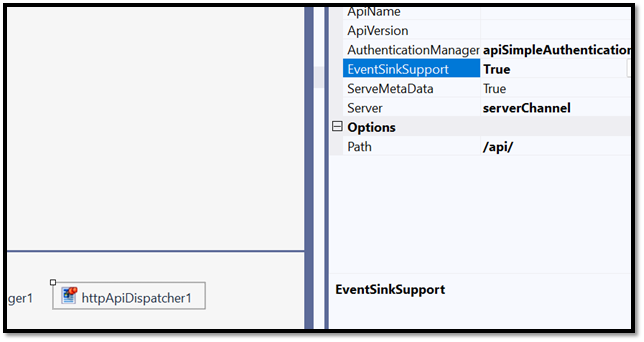
If you are using the Oxygene version of the sample, the same components and properties apply to the designer for working the same way.
Step 2. Update the RODL
The dispatcher needs to know which service operations to expose. This is done via HttpApiPath custom attributes in the RODL file.
Open your .rodl file in the Service Builder. For each operation you want to expose, select it, click Attributes at the bottom of the panel, then Add Item, and enter:
- Name:
HttpApiPath -
Value: the route for that operation, for example:
LoginService/LoginandLoginService/LogoutHTTPChatService/SendMessageandHTTPChatService/GetLoggedUsers
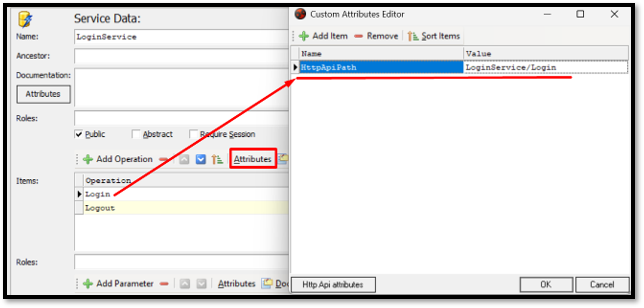
Do this for every operation you want to be accessible via HTTP API.
Complete .rodl file with all attributes already configured can be downloaded here. You can replace the one in your project with it directly.
Once this is done, rebuild and run the server.
Step 3. Generate the PHP Client
With the server running and activated, open your browser and navigate to:
You will see the JSON specification for your server.
You can use tools like OpenAPI Generator CLI or Swagger to generate a PHP client — but the same approach works for Python, Ruby, Go, TypeScript, and any other language supported by tools.
You will get a typed PHP library with all the API methods ready to call - but it does not include any application logic.
We have already done this. The complete PHP client can be downloaded here — it is a fully working console client built on top of the generated library. Use it from the sample:
cd "C:\..\SwaggerClient-php"
php chat.php
Now you have a fully working PHP client ready to use.
The sample includes composer.phar — so if you don't have Composer installed globally, you can run:
php composer.phar install
Or install Composer globally from getcomposer.org/download, then run:
composer install
Authentication: The Token Lives in the Header
When you call Login, the ClientToken you need for all subsequent requests comes back in the Access-Token response header — not in the response body (which returns the internal SessionID).
Make sure to read it from the headers and pass it on every subsequent call.
If you are generating a client yourself, make sure to read the token from the response headers after logging in and pass it on every subsequent call. Without this, every authenticated request will return a 400 Bad Request.
The ready-made PHP client included with this sample already handles this correctly, so if you're using it as-is, no extra steps are needed.
Receiving Events
Since HTTP is request-response, the server cannot push events to you directly.
Instead, you poll the $GetEvents endpoint every couple of seconds — it returns everything that happened since your last call, in order.
Each event in the response carries a __type field that identifies what happened — HTTPChatEvents_OnLogin, HTTPChatEvents_OnSendMessage, HTTPChatEvents_OnLogout, and so on. The remaining fields are the event parameters.
The included PHP client handles this automatically. Multiple clients, one server, zero shared libraries — the PHP client knows nothing about Remoting SDK internals. It just speaks HTTP and JSON.
What This Means
If you're integrating with systems written in languages Remoting SDK doesn't directly support, HTTP-based API has you covered.
Generate a client in your language of choice, grab the ClientToken from the Access-Token header, and poll /$GetEvents for events.
That's all there is to it.