ServiceGroup sample (.NET)
Overview
This sample demonstrates how to use ServiceGroups to implement server-side role-based access control. Unlike client-side filtering, ServiceGroups provide true security — the server enforces access rules that cannot be bypassed by clients.
The key security principle: even if a client attempts to call a restricted service, the server will reject the request. The client UI simply reflects what the server allows, but the real protection happens on the server.
The sample implements a multi-port server architecture:
- Admin channel (port 8099): Full access to all services
- Dept1 channel (port 8098): Access to LoginService and UserService only
- Dept2 channel (port 8097): Access to LoginService and ReportService only
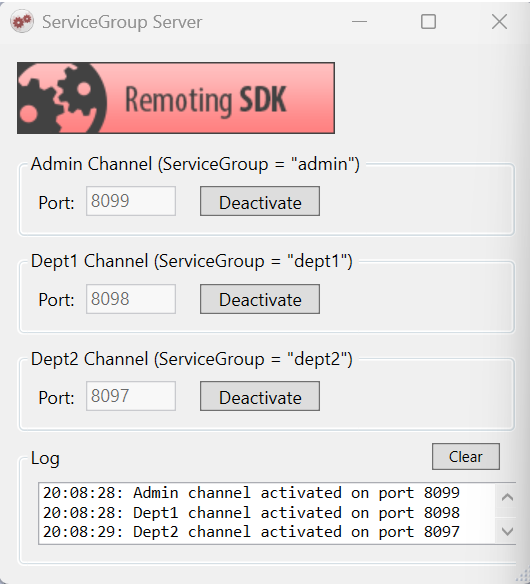
Server-side security in action
The screenshot below demonstrates the security model. A Dept1 client attempts to call AdminService — even though the button is visible in the UI, the server rejects the request because AdminService is not available on the Dept1 channel:
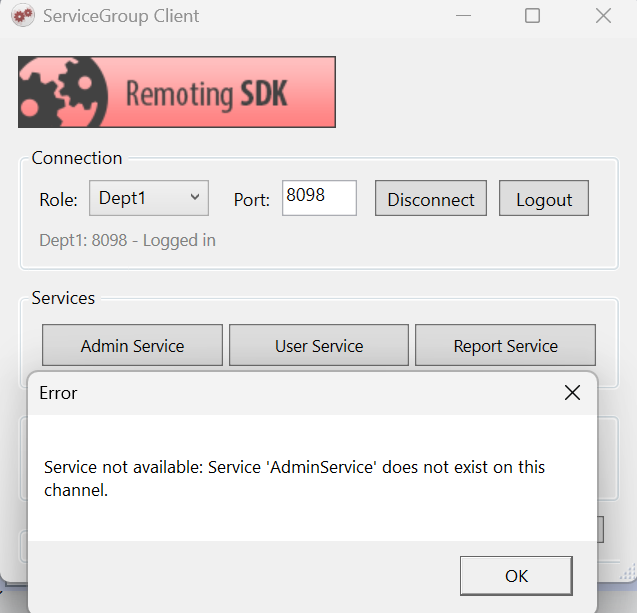
This is the core principle: client-side checks can always be bypassed by a determined attacker, but ServiceGroups enforce security at the server level where it cannot be circumvented.
Why server-side security matters
- Each server channel is assigned a ServiceGroup (e.g.,
"admin","dept1") - Each service declares which groups can access it via
[ServiceGroup]attribute - When a request arrives, the server checks if the channel's group is allowed — before executing any code
This is defense in depth: the client can provide a good user experience by hiding unavailable features, but the server provides the actual security.
Getting started
- Compile the entire solution.
- Run the server application and activate one or more channels.
- Run one or more client applications.
- Select a role (Admin/Dept1/Dept2) to connect to the corresponding channel.
- Click Connect, then Login to access services.
- Try calling different services — notice that restricted services are rejected by the server.
- Use the Broadcast feature (Admin only) to send events to all connected clients.
Examine the code
Server configuration
Each channel is created with a specific ServiceGroup:
private IpSuperHttpServerChannel CreateChannel(int port, string serviceGroup)
{
    var channel = new IpSuperHttpServerChannel
    {
        Port = port,
        ServiceGroup = serviceGroup  // This is the key security setting
    };
    channel.Dispatchers.Add(new MessageDispatcher("bin", _binMessage));
    return channel;
}

// Create channels for different roles
_adminChannel = CreateChannel(8099, "admin");
_dept1Channel = CreateChannel(8098, "dept1");
_dept2Channel = CreateChannel(8097, "dept2");
Service protection
Services declare which groups can access them using the [ServiceGroup] attribute. A service can belong to multiple groups:
// Only Admin can access this service
[ServiceGroup("admin")]
public class AdminService : RemObjects.SDK.Server.Service, IAdminService

// Admin and Dept1 can access this service
[ServiceGroup("admin")]
[ServiceGroup("dept1")]
public class UserService : RemObjects.SDK.Server.Service, IUserService

// Admin and Dept2 can access this service
[ServiceGroup("admin")]
[ServiceGroup("dept2")]
public class ReportService : RemObjects.SDK.Server.Service, IReportService

// All roles can access LoginService
[ServiceGroup("admin")]
[ServiceGroup("dept1")]
[ServiceGroup("dept2")]
public class LoginService : RemObjects.SDK.Server.Service, ILoginService
RODL configuration
The same groups are defined in ServiceGroup.RODL using the ROServiceGroups custom attribute:
AdminService    → ROServiceGroups: "admin"
UserService     → ROServiceGroups: "admin,dept1"
ReportService   → ROServiceGroups: "admin,dept2"
LoginService    → ROServiceGroups: "admin,dept1,dept2"
Event broadcasting
The sample also demonstrates broadcasting events to all connected clients, regardless of their role. Admin can send a broadcast message that all connected Dept1 and Dept2 clients will receive:
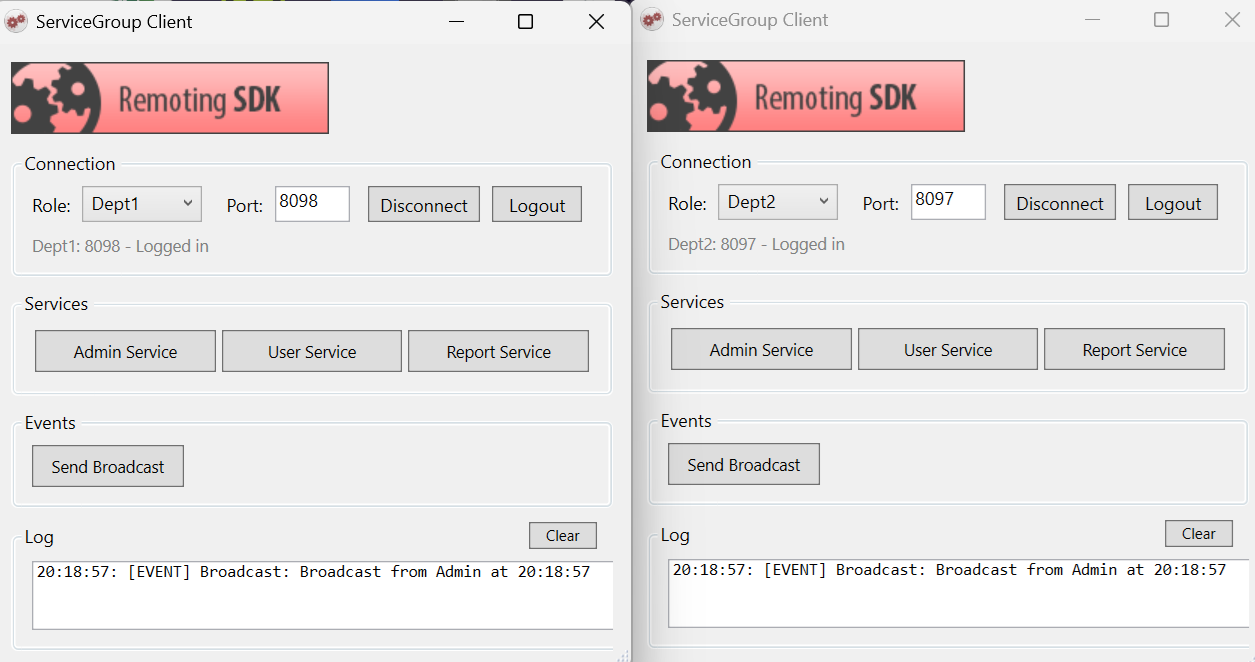
Server-side code to send broadcast:
public virtual void SendBroadcast(string message)
{
    var eventSink = (IPublicEvents)this.GetEventSink(typeof(IPublicEvents));
    if (eventSink != null)
        eventSink.Broadcast(message);
}
Clients subscribe to events after login and receive broadcasts on a background thread:
_eventReceiver = new EventReceiver();
_eventReceiver.Channel = _channel;
_eventReceiver.Message = _message;
_eventReceiver.RegisterEventHandler(this, typeof(IPublicEvents));