Load Balancing sample (.NET)
Overview
This sample demonstrates client-side load balancing and fault tolerance using Remoting SDK's built-in IpTcpClientChannel capabilities.
The client connects to a pool of servers and automatically distributes calls across them. If a server becomes unavailable, the client detects it via probing and routes requests to the remaining active servers — with no changes required on the server side.
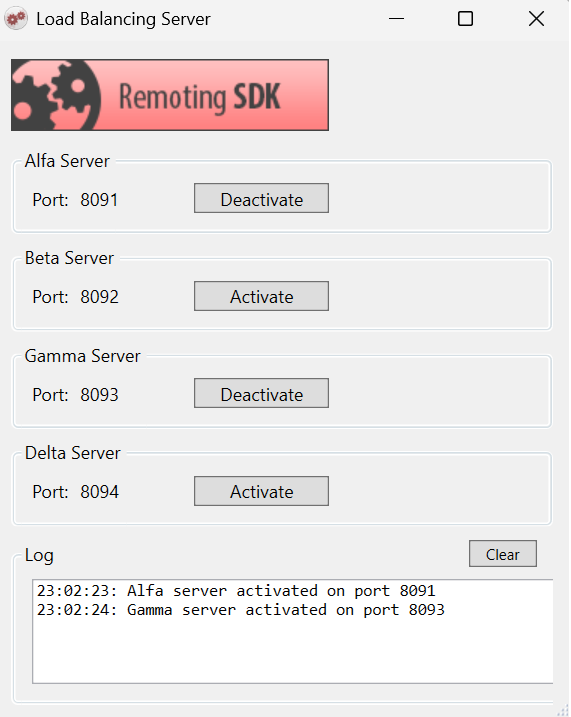
The sample runs four independent server instances (Alfa, Beta, Gamma, Delta) on ports 8091–8094. Each instance can be activated and deactivated independently at runtime to observe how the client responds.
Architecture
Server: a single WPF application hosting four IpTcpServerChannel instances, each on its own port. Each channel can be toggled on or off independently using buttons in the UI, letting you simulate servers going up and down during a live session.
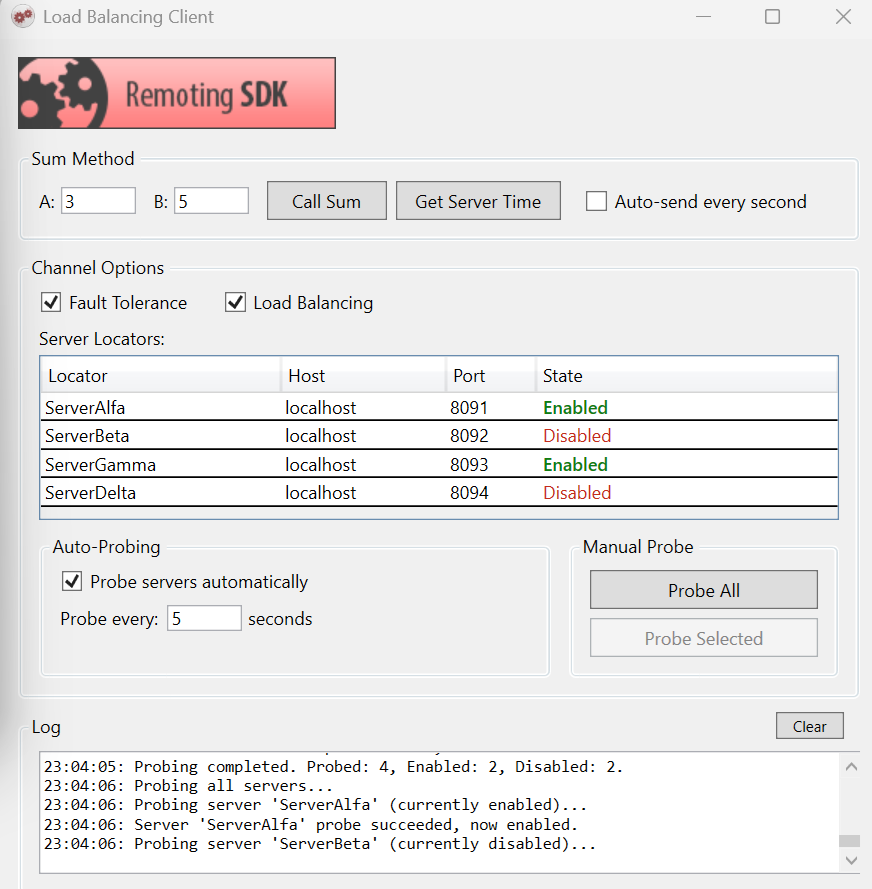
Client: a WPF application with a single IpTcpClientChannel configured with four ServerLocator entries — one per server. The channel handles load balancing and fault tolerance transparently via DispatchOptions.
Getting started
- Compile the entire solution.
- Run the server application and activate one or more server instances using the Activate buttons.
- Run the client application.
- Click Probe All to let the client discover which servers are available.
- Use Call Sum or Get Server Time to send requests — watch the log to see which server handles each call.
- Deactivate a server mid-session and observe the client automatically routing around it.
- Enable Auto-send every second on the client to continuously send requests and observe live failover behavior.
Examine the code
Server: four independent channels
The server creates four IpTcpServerChannel instances using a shared helper method. Each channel gets its own port and shares the same BinMessage dispatcher:
private IpTcpServerChannel CreateChannel(int port)
{
    var channel = new IpTcpServerChannel { Port = port };
    channel.Dispatchers.Add(new MessageDispatcher("bin", _message, true, true));
    ((ISupportInitialize)channel).BeginInit();
    ((ISupportInitialize)channel).EndInit();
    return channel;
}

_alfaChannel  = CreateChannel(8091);
_betaChannel  = CreateChannel(8092);
_gammaChannel = CreateChannel(8093);
_deltaChannel = CreateChannel(8094);
Each channel is toggled independently at runtime — no restart required:
channel.Port = getPort();
channel.Active = true;   // activate
// ...
channel.Active = false;  // deactivate
Client: ServerLocators and DispatchOptions
The client channel is configured with a list of ServerLocator entries, one per server. DisableOnFailure = true tells the channel to automatically mark a locator as disabled when a call to it fails:
channel.ServerLocators = new List<ServerLocator>
{
    new ServerLocator { Name = "ServerAlfa",  Host = "localhost", Port = 8091, DisableOnFailure = true, Enabled = false },
    new ServerLocator { Name = "ServerBeta",  Host = "localhost", Port = 8092, DisableOnFailure = true, Enabled = false },
    new ServerLocator { Name = "ServerGamma", Host = "localhost", Port = 8093, DisableOnFailure = true, Enabled = false },
    new ServerLocator { Name = "ServerDelta", Host = "localhost", Port = 8094, DisableOnFailure = true, Enabled = false },
};
DispatchOptions controls the routing behavior. Both flags can be combined:
channel.DispatchOptions = DispatchOptions.FaultTolerant | DispatchOptions.LoadBalanced;
FaultTolerant— if the selected server fails, the channel automatically retries on another available server.LoadBalanced— calls are distributed across all enabled locators in round-robin fashion.
Both options are toggleable at runtime through the client UI, so you can observe the difference in behavior interactively.
Server probing
The client probes servers on a configurable interval to keep the list of available servers up to date:
channel.ProbeServers = true;
channel.ProbeFrequency = 5000; // milliseconds
Probing can also be triggered manually — for all servers at once or for a specific one:
_channel.ProbeAll();               // probe all locators
_channel.Probe(locator.Locator);   // probe a single locator
The channel exposes events to observe probing activity in detail:
channel.OnBeforeProbingServers += ch =>
    AddLog("Probing all servers...");

channel.OnAfterProbingServers += (ch, probed, enabled, disabled) =>
    AddLog($"Probing completed. Probed: {probed}, Enabled: {enabled}, Disabled: {disabled}.");

channel.OnAfterProbingServer += (ch, locator, failed) =>
{
    string result = failed ? "failed" : "succeeded";
    AddLog($"Server '{locator.Name}' probe {result}, now {locator.Enabled ? "enabled" : "disabled"}.");
};

channel.OnLocatorAssigned += (ch, locator) =>
    AddLog($"Locator '{locator.Name}' assigned for this call.");
Re-enabling all locators when all fail
If all locators end up disabled (e.g., all servers went down), the client re-enables them all so it can recover automatically when servers come back:
private void ReEnableIfAllDisabled()
{
    bool anyEnabled = _channel.ServerLocators.Any(l => l.Enabled);
    if (!anyEnabled)
    {
        AddLog("All locators are disabled, re-enabling all.");
        foreach (ServerLocator locator in _channel.ServerLocators)
            locator.Enabled = true;
    }
}